November 25, 2026
Free PDF to Audio Reader: Listen Now or Save an MP3?
The difference between a PDF to audio reader and an MP3 converter, and which free limits to check.
A free PDF to audio reader plays your document inside an app. A converter makes an MP3 you can copy elsewhere. Read PDF Aloud is the first kind and does not export audio files, so if an MP3 is what you need, skip to that section.
The two get mixed up because both start with a PDF and end with a voice. Deciding which one you want takes a minute and saves a subscription you would not use.
Reader or converter?
| You want to | Choose |
|---|---|
| Listen to a chapter on the way home | Reader |
| See the page while it is read | Reader |
| Pick up where you stopped yesterday | Reader |
| Put the book on a car USB stick or an old player | Converter |
| Send someone an audio file | Converter, if you have the right to share the text |
| Check a figure or a table while listening | Reader |
When a free PDF to audio reader is enough
For most listening, a reader is enough, and several cost nothing to start.
- Microsoft Edge on Windows or Mac: Read aloud in the PDF viewer.
- Acrobat Reader on a computer: Read Out Loud. On iPhone, Adobe’s App Store listing includes read aloud with free voices.
- iPhone and iPad: Speak Screen, under Settings > Accessibility > Read & Speak. Swipe down with two fingers from the top of the screen and it reads what you can see.
- Read PDF Aloud on iPhone and iPad: 15 minutes of listening per 24 hours with every feature open.
Free limits differ in kind. Some tools limit minutes, some limit characters, some limit voices, and some are free only for listening and charge for the file. Free ways to read a PDF aloud goes through what to check.
What listening in a reader gives you
A file plays from start to end. A reader knows the document, so it can highlight the sentence on the page, remember your position, keep bookmarks and notes, and let you change the voice or the speed without making the audio again.
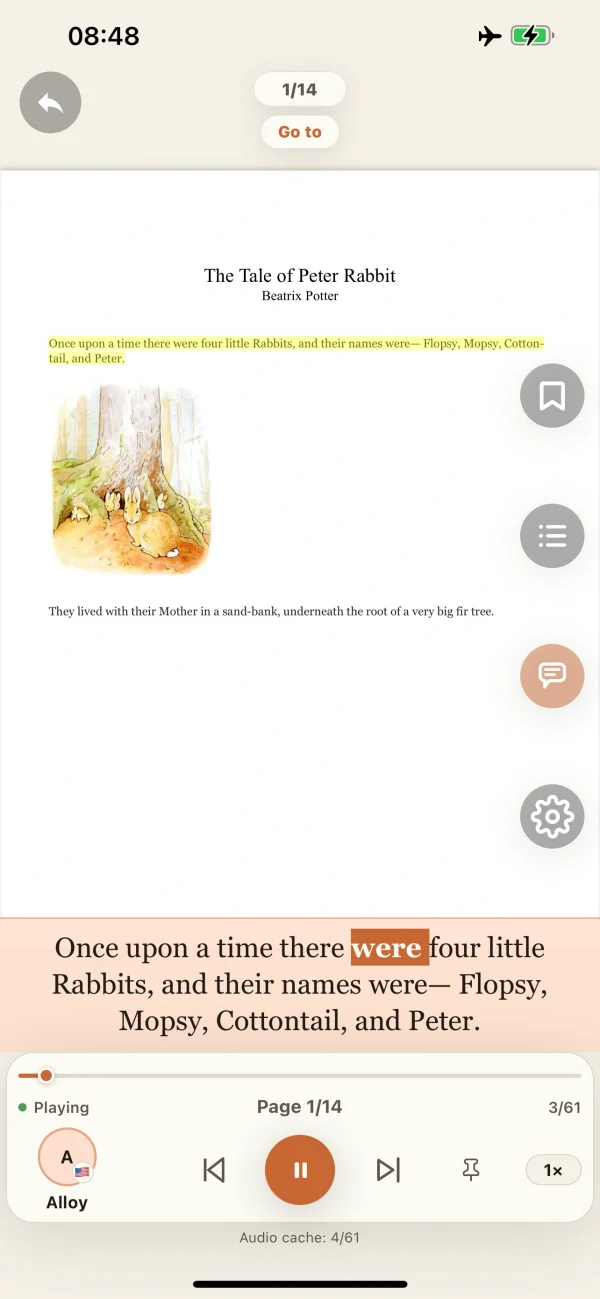
In Read PDF Aloud the speech is made on the device, so you can listen to a PDF offline with a file and a voice you have already prepared. Playback continues with the screen locked.
If you need an MP3
Look for a tool that names the format. These say so on their own pages, as of November 25, 2026:
- NaturalReader for iPhone lists “Download MP3” on the App Store. On its desktop page, MP3 conversion is in the paid versions.
- Balabolka for Windows is freeware and can save text as an audio file.
Before converting a whole book, convert two pages. Check the order, the pronunciation of names and whether the free version stops early. Convert only text you have the right to copy, and keep the PDF: an audio file has no page numbers to cite.
Make any PDF easier to listen to
These help with a reader and a converter alike.
- Select a sentence first. If you cannot, the pages are pictures and need text recognition.
- Watch for running headers and page numbers read on every page. Read PDF Aloud can skip the top and bottom margins; that option comes with the Lifetime and 3-month plans and can be tried during the free minutes.
- Split reference material from prose. Bibliographies and tables are poor listening.
- Look for an EPUB. Flowing text has no columns or page breaks to confuse the order.
Questions about PDF to audio
Is there a free PDF to voice reader with no time limit?
The reading features in Edge, Acrobat Reader and Speak Screen are not metered in minutes. Dedicated apps with natural voices usually limit free use.
Does Read PDF Aloud create an audiobook?
No. It reads your PDF inside the app and remembers your place. See listening to PDF books.
Can I turn a scanned PDF into audio?
Yes, after the words have been recognized. Check a page of the result before listening to fifty.
Which is better for studying?
A reader, because you can stop and look at the formula. An MP3 is better for a second pass over something you have already understood.
Start with one chapter
Open a chapter in a reader and listen for ten minutes. If you only wanted to hear it, you are done. If you find yourself needing a file, you now know what to look for. How to choose a PDF audio reader has a short test for comparing apps.