November 25, 2026
PDF Voice Reader: How to Choose a Voice, Language and Speed
How to compare PDF voice reader voices on your own document, match the language and set a speed you can follow.
A PDF voice reader is only useful if you can listen to its voice for an hour. Ten seconds of a sample will not tell you that, but comparing two voices on your own paragraph will.
This guide covers the voice itself: the language, the sound, the speed and the mistakes. If you are still choosing the app, start with how to choose a PDF audio reader.
Hear the difference first
These four samples are voices from Read PDF Aloud, made by the app’s own on-device speech. Each says the same sentence in its language: “Reading a little every day is the easiest way to learn a new language.”
Listen to every voice sample, in 31 languages
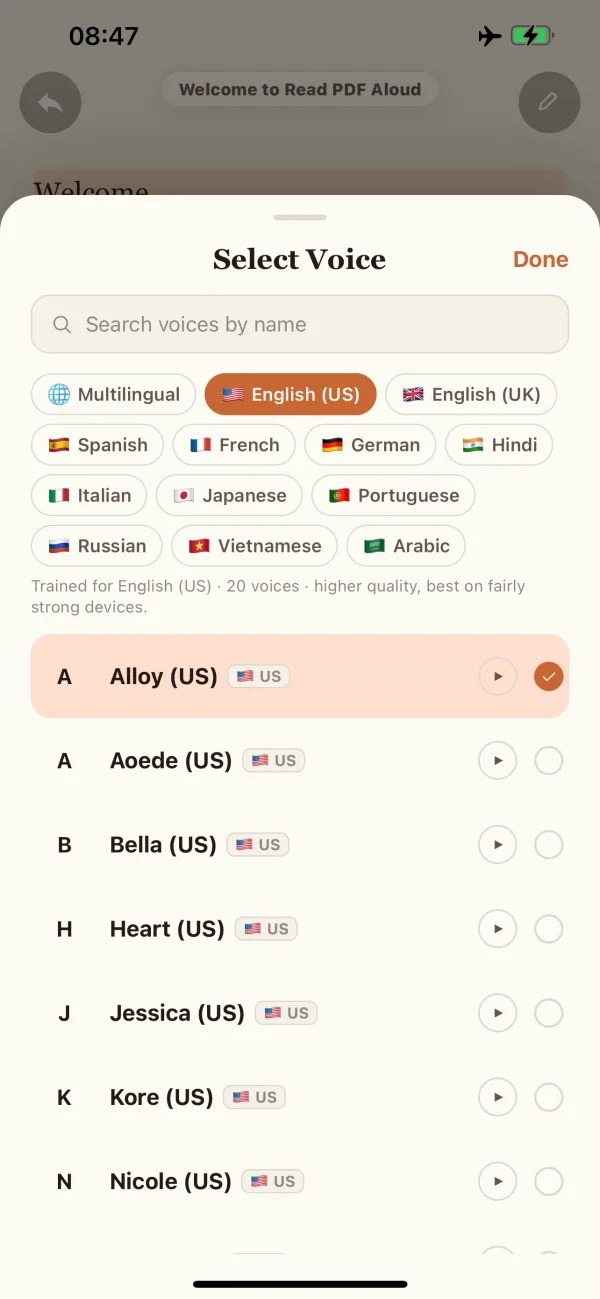
Match the voice to the document’s language
A voice reads the letters it is given. Give a French PDF to an English voice and you get French words with English sounds. Choosing a different voice does not translate anything.
Documents that mix languages are harder. Pick the language of most of the text, and expect names and quotations in other languages to sound off. For a long passage in a second language, paste it into a separate note and give that note its own voice.
Compare two voices on the same paragraph
Use a paragraph from the middle of your document, not the title page.
- Pick a paragraph with a name, a number and at least one long sentence.
- Play it with the first voice at 1×.
- Switch voices and play the same paragraph again.
- Ask which one you had to concentrate on less. That is the one to keep.
- Listen to five more minutes before deciding. Some voices tire you out later.
Find a speed you can keep
Most people start too fast. In Read PDF Aloud the range is 0.5× to 1.75×. Start at 1× for anything new, move to 1.25× once you can follow without looking, and drop back for legal text, definitions or numbers you need to remember.
If you keep rewinding, the speed is wrong, or the passage should be read with your eyes.
On-device or online voices
Some readers send text to a server and stream the result. Others make the speech on the phone.
| Question | On-device voice | Online voice |
|---|---|---|
| Works without a connection? | Yes, once the voice is on the device | Usually not, unless audio was downloaded first |
| Where does the text go? | It stays on the device for speech | To the service; read its privacy policy |
| What limits it? | The phone’s memory and speed | The connection and the service’s limits |
| Storage | Voices take space | Little |
Read PDF Aloud uses on-device voices. Some languages need a one-time voice download, so do that on Wi-Fi and then test it offline.
When a word sounds wrong
- Abbreviations and units: voices guess. Hearing “Dr.” or “km/h” read oddly once does not mean the voice is bad.
- Numbers and dates: listen to one table or one dated paragraph before trusting a long report.
- Names: they are the most common mistake, in every voice.
- Broken words: if a hyphenated line end is read as two words, the PDF’s text is split. Another voice will not fix it.
- Nonsense: a scanned page may have been recognized badly. Check the recognized text.
Try a PDF voice reader for free
Read PDF Aloud includes 15 minutes of listening per 24 hours with every voice available, enough for the comparison above. Longer listening needs a paid plan. Acrobat Reader on iPhone lists read aloud with free voices, and Speak Screen uses the voices built into iOS. Free ways to read a PDF aloud compares them.
Try the voices on your own PDF
Questions about PDF voices
Which PDF read voice sounds the most natural?
The answer changes with the language and the text. A voice that suits a novel can be tiring on a technical manual. Compare two on your own paragraph.
Can I change the voice in the middle of a document?
In Read PDF Aloud, yes. Open the voice list from the player, choose another voice and continue.
Can a PDF document voice reader use my own voice?
Some apps offer voice cloning. Read PDF Aloud does not.
Why does the voice need a download?
Because it runs on the phone. After the download it works without a connection.
Pick one and listen for ten minutes
Choose two voices, use one paragraph, keep the winner, and set a speed you can follow without effort. Then read something you wanted to read anyway. For the wider picture, see how to read PDF aloud.