November 25, 2026
Software to Read PDF Aloud on Windows and Mac
Built-in tools and programs that read PDFs aloud on Windows and Mac, with what each one needs.
You may not need new software to read PDF aloud on a computer. Microsoft Edge includes Read aloud in its PDF viewer on Windows and Mac, and macOS can speak selected text in many apps.
A separate program is worth installing when you want to save audio, read a long document in order, or open a file your browser handles badly. This guide separates what is already there from what you would download. We checked each maker’s own page on November 25, 2026, and have not scored voices or speed.
Quick comparison
| Software | Runs on | Good starting point for |
|---|---|---|
| Microsoft Edge | Windows, Mac | Hearing a PDF now without installing anything |
| macOS Speak selection | Mac | A paragraph or a page you can select |
| Adobe Acrobat Reader | Windows, Mac | Reading a page or the rest of a document |
| Xodo PDF Reader | Windows, Mac, Linux | A free reader with pause and speed controls |
| Foxit PDF Reader | Windows, per its guide | Read Out Loud with its own voice and speed settings |
| NaturalReader | Windows, Mac | Free voices for PDF, DOCX, TXT and EPUB; MP3 in paid versions |
| Balabolka | Windows | Saving text as an audio file, as freeware |
Already on your computer
Microsoft Edge
Open the PDF in Edge, from a link or by dragging the file onto the window, and look for Read aloud in the PDF toolbar. Microsoft’s documentation lists Read aloud among the PDF reader’s features on Windows and macOS. Our Edge guide covers shortcuts and a missing button.
macOS Speak selection
Open System Settings > Accessibility > Read & Speak and turn on Speak selection. Select text in the PDF and press Option-Esc; press it again to stop. Many Mac apps also have Edit > Speech > Start Speaking. Apple’s instructions show how to change the shortcut, and our Mac guide covers voices and silence.
It reads what you select, so it suits a page better than a book.
Free software to read PDF aloud
Adobe Acrobat Reader
Open View > Read Out Loud and choose Read This Page Only or Read to End of Document. To change the voice, open the Reading preferences and turn off Use Default Voice. Adobe’s read-aloud page has the steps. See Adobe Reader Read Out Loud for shortcuts and scans.
Xodo PDF Reader
Xodo describes its desktop reader as free, for Windows, Mac and Linux. Open the PDF and choose Read Out Loud from the View menu; pause, resume and speed controls are included. Xodo’s guide.
Foxit PDF Reader
Foxit’s instructions use View > Read > Activate Read Out Loud, with voice settings under File > Preferences > Speech. The Foxit post dates from 2021, so menu names may differ in a current version.
NaturalReader desktop
The free version works with PDF, DOCX, TXT and EPUB and its free voices without a time limit, according to NaturalReader’s software page. Converting to MP3 and recognizing scanned pages belong to paid versions. The page lists Windows 7 to 10 and Mac OS X 10.11 or later, so check that it supports a newer system before paying.
Programs that save audio
If the goal is a file for a car stereo or an old player, look for a program that says it saves audio. Balabolka is freeware, lists PDF among its formats and can save text as an audio file; it uses the speech voices installed on the PC. NaturalReader lists MP3 conversion in its paid versions.
Reading aloud and exporting audio are different features. Edge, Acrobat Reader and the macOS shortcut play the speech and do not give you a file.
Before you download read aloud software
“Read aloud” is also the name of browser extensions and small utilities, so a search for a download brings up very different things.
- Download from the maker’s own site rather than a download portal.
- Check whether the free version limits minutes, characters or voices.
- Check whether a natural voice runs on your computer or on a server, if the document is confidential.
- Try one page with the layout you use most. Columns and footnotes cause more trouble than the voice does.
- For a scan, confirm that text recognition is included, and at what price.
Keep listening away from the computer
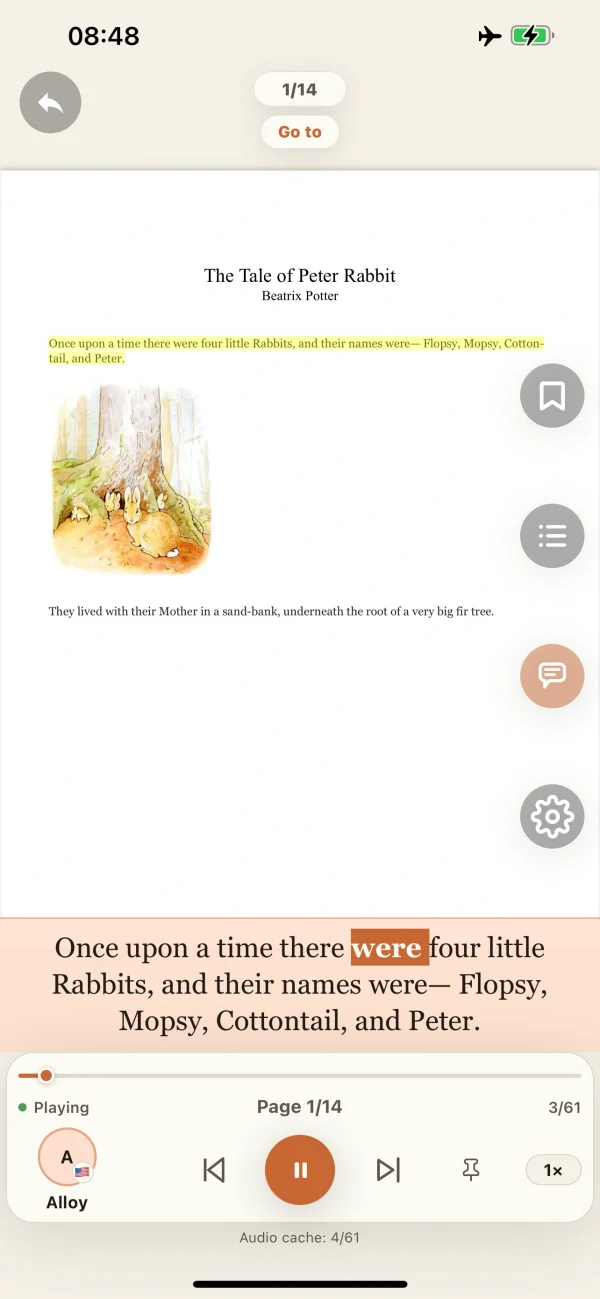
Desktop software stops when you leave the desk. Read PDF Aloud is an iPhone and iPad app: it keeps the PDF page on screen, highlights each sentence and continues with the screen locked. Speech is made on the device. The free plan allows 15 minutes of listening per 24 hours.
There is no Windows version. The iPad app can be installed on a Mac with an M1 chip or later, but Apple labels it “Not verified for macOS”, so we do not recommend it as Mac software.
Try Read PDF Aloud on iPhone or iPad
Questions about software that reads PDF aloud
What is the simplest program to read PDF out loud on Windows?
Microsoft Edge, because it is already there. Try it before installing anything.
Why does my software skip the page?
The page is probably a picture. Try to select a sentence. If you cannot, the file needs text recognition first.
Is there free software without a time limit?
The reading features of Edge, Acrobat Reader and macOS are not sold by the minute. See free ways to read a PDF aloud.
Choose by the task
One page: Edge or the Mac shortcut. A long report: Acrobat Reader or Xodo. A saved audio file: Balabolka or a paid NaturalReader. Listening on the move: a phone app. The general guide to reading PDF aloud compares the methods in more depth.