November 25, 2026
An App That Reads Documents Aloud: Word, EPUB, TXT and PDF on iPhone
How Word, EPUB, TXT and PDF files open and read aloud on iPhone and iPad, and what each format leaves out.
Read PDF Aloud is an iPhone and iPad app that reads documents aloud: PDF, EPUB, DOCX and TXT files, with voices that run on the device. The formats do not behave the same way. A PDF keeps its pages, while a Word file or an EPUB becomes flowing text.
Knowing the difference before you import saves you from looking for a footnote that was never read, or wondering where the page numbers went.
What an app that reads documents aloud keeps from each file
| File | Opens as | Worth knowing |
|---|---|---|
| Original pages | The sentence being read is highlighted on the page | |
| EPUB | Flowing text | Books protected with DRM will not open |
| DOCX | Flowing text | Main body only: no headers, footers, footnotes or comments |
| TXT | Flowing text | Useful for text you have cleaned up yourself |
| Pasted text and notes | Flowing text | The fastest way to try a voice |
| Photo or camera scan | A PDF with recognized text | Accuracy depends on the picture |
Open a document in the app
Everything you listen to lives in one library. Keep the file on the device if you plan to listen without a connection; a file that exists only in cloud storage has to download first.
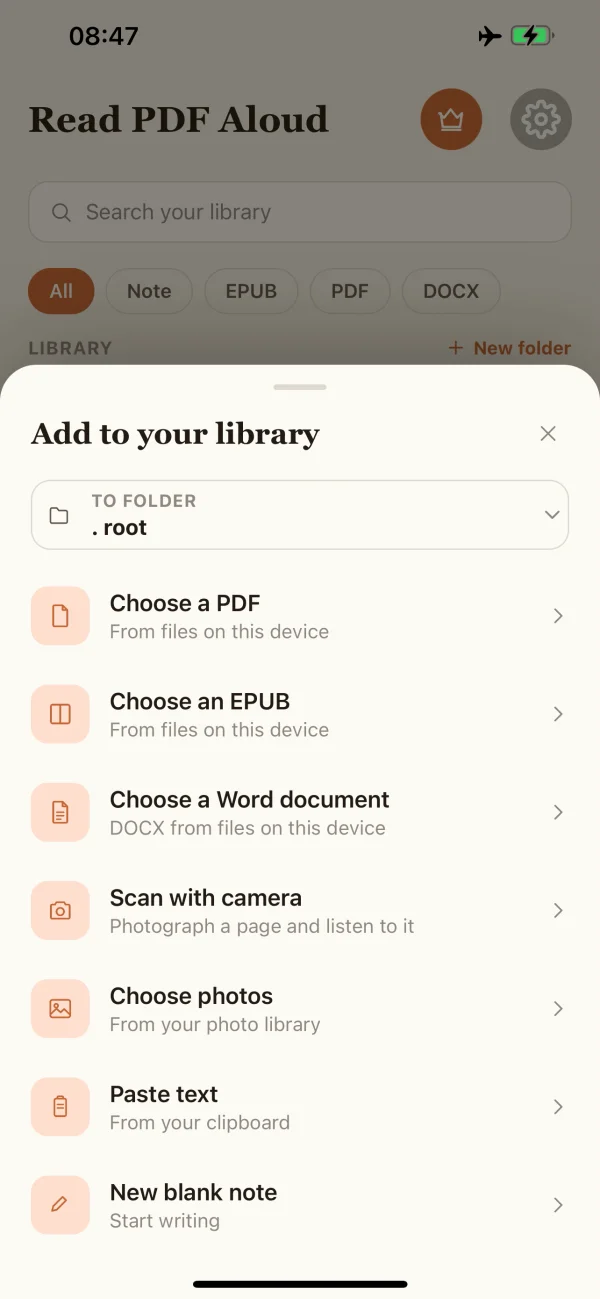
- Tap the plus button in the library to open “Add to your library”.
- Tap Choose a PDF, Choose an EPUB or Choose a Word document, then pick the file.
- For text you have copied, tap Paste text. To write something yourself, tap New blank note.
- Open the new item, choose a voice for its language and start playback.
For a TXT file, find it in the Files app, tap Share and open it in Read PDF Aloud. PDF, EPUB and DOCX files can be opened this way too.
Read a Word document aloud on iPhone
Save the document as DOCX. The older .doc format cannot be opened, so if that is what you have, open it in Word or Pages and save a DOCX copy.
Once imported, the text is read in order from the main body. Headers, footers, footnotes and comments are left out, which is usually what you want when listening to a report. If the footnotes matter, export the document as a PDF instead and import that.
Already in Word? Its own Read Aloud may be enough
Word has a Read Aloud command of its own. Microsoft lists it for Windows, macOS, iOS and Android, with Office 2019, Office 2021 or Microsoft 365. If you want to hear a draft while you edit it, use that: Microsoft’s Read Aloud instructions.
A separate reader makes more sense when you want the file in a library beside your PDFs, your place saved, and voices that work offline.
Read an EPUB aloud on iPhone
An EPUB without DRM opens as flowing text, so there are no fixed pages to match. Books bought from most stores are protected and will not open in another app; this includes Kindle and Apple Books purchases. Public-domain books, files from a publisher that sells without DRM, and books you made yourself are the usual sources.
If you have the same book as a PDF and need page numbers for a class, import the PDF. Our guide to listening to PDF books explains that choice.
Reading long documents out loud without losing your place
A contract, a thesis or a manual takes more than one sitting. Reading progress is saved for each item, and bookmarks and notes let you mark a passage to check later. Playback speed runs from 0.5× to 1.75×; slow down for dense paragraphs rather than rewinding them.
Playback continues in the background and with the screen locked. The free plan allows 15 minutes of listening per 24 hours across all documents, so use it to test the file you care about before choosing a paid plan.
Paper documents, letters and handouts
Tap Scan with camera to photograph a page, or Choose photos to pick several pictures at once. They become a PDF and the words are recognized on the device. Flat pages, even light and sharp focus make the biggest difference. See how to prepare scans and photos before a long document.
If a document won’t open or sounds wrong
- Still in the cloud: open the file once in the Files app so it finishes downloading, then import it again.
- Protected: encrypted PDFs, DRM-protected EPUBs and old .doc files cannot be read.
- Wrong voice language: choose a voice for the language of the text. Changing the voice does not translate it.
- Wrong order: columns and tables in a PDF can change the reading order. Try a plain page from the same file.
- No words at all: the PDF may contain only pictures of pages and need text recognition.
Get help with imports and playback
Questions about reading documents aloud
Can it read a .doc file?
No. Save it as DOCX first.
Does it read footnotes?
In a DOCX file, no. In a PDF, footnotes are part of the page text and may be read where they appear.
Can I listen to documents offline?
Yes, once the file and the voice are on the device. Speech is made on the phone. Downloading a voice, fetching a cloud file and making a purchase need a connection.
Can it read PowerPoint or web pages?
Not directly. Export slides as a PDF. For a web page, copy the text and paste it, or use Safari’s Listen to Page.
Try it with the document you need today
Import one file, play a paragraph, and check the voice and the order. If you are choosing between formats, start with the PDF: it keeps the page beside the sound. For every way to read PDF aloud, including on a computer, see the main guide.