November 25, 2026
Apps That Read PDFs Out Loud: How 6 iPhone and iPad Options Compare
Six iPhone and iPad apps that read PDFs out loud, compared by offline voices, scanned pages, file types and free limits.
The best app that reads PDFs out loud depends on where you listen and what kind of PDF you have. Acrobat Reader does it with free voices. Voice Dream and Read PDF Aloud use voices that work offline. NaturalReader can also save an MP3.
We make Read PDF Aloud, so we say plainly where another app is the better choice. The facts below come from each app’s US App Store listing, read on November 25, 2026. We have not rated the voices against each other.
Quick comparison
“Not stated” means the listing does not say, so check inside the app before you rely on it.
| App | Listening offline | Scans and photos |
|---|---|---|
| Read PDF Aloud | Yes, voices run on the device | Camera, photos and image-only PDFs, recognized on the device |
| Acrobat Reader | Not stated | Text recognition is listed with the paid tools |
| Speechify | Not stated | Photograph a page to hear it |
| Voice Dream | Yes, all voices work offline | Built-in scanner on the device, Latin alphabets only |
| NaturalReader | By downloading MP3 files | Camera scanner |
| ElevenReader | Listed as a feature; offline mode is also named under Ultra | Not stated |
| App | Other files it opens | Minimum iOS and free use |
|---|---|---|
| Read PDF Aloud | EPUB, DOCX, TXT, pasted text, notes | iOS 15.1. 15 minutes of listening per 24 hours |
| Acrobat Reader | iOS 18.3. Read aloud with free voices | |
| Speechify | Docs, articles, email | iOS 18. Free to install, in-app purchases |
| Voice Dream | Word, PowerPoint, RTF, web articles, EPUB without DRM | iOS 15.1. Free trial, then a subscription is required |
| NaturalReader | Word, PowerPoint, RTF, TXT, images, EPUB without DRM | iOS 16.4. Free to install, in-app purchases |
| ElevenReader | Docs, EPUB, article links, pasted text | iOS 18. Free to install, in-app purchases |
Which app that reads PDFs out loud fits you?
You want to hear a PDF now, for free
Try Acrobat Reader if your iPhone runs iOS 18.3 or later. Adobe lists read aloud with free voices and says you can read PDFs without an account. For a few paragraphs, the speech feature built into iOS may be enough; see how to read text aloud on iPhone.
You listen without a connection
Choose an app whose voices run on the device. Read PDF Aloud makes the speech locally, so a file and a voice you have already prepared keep working in airplane mode. Voice Dream says the same about all of its voices. Either way, test a passage in airplane mode before a trip.
You need an MP3
Read PDF Aloud does not export audio. NaturalReader lists MP3 download, so start there if you want a file to copy to another device.
You want ready-made audiobooks too
ElevenReader and Speechify both list audiobook catalogs along with your own files. Read PDF Aloud has no catalog; it reads the documents you bring.
You have an older iPhone
Read PDF Aloud and Voice Dream install on iOS 15.1. Three of the six need iOS 18 or later. On an older phone, generating a voice on the device can be slower, so try a page before choosing a plan.
Your PDFs are scans
Pick an app that recognizes text. Read PDF Aloud does this on the device for image-only pages, camera scans and photos. Accuracy depends on the picture, so check a scanned page before a long session.
What Read PDF Aloud does, and what it does not
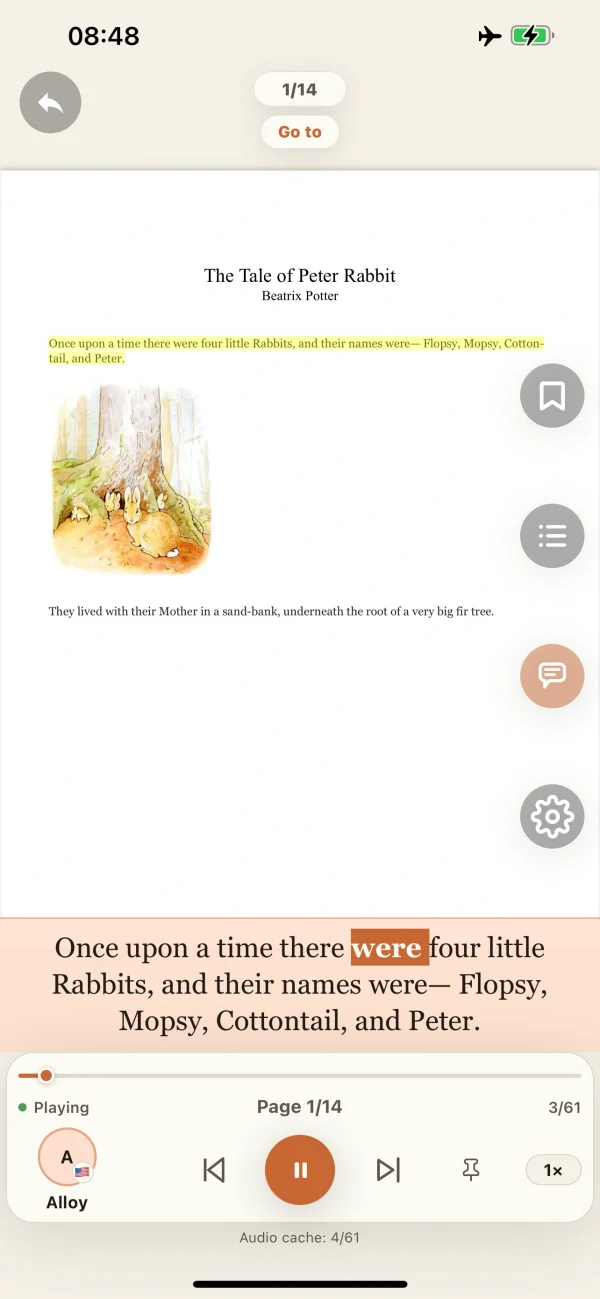
Read PDF Aloud keeps the original PDF page on screen and highlights the sentence being read. It speaks in 31 languages, keeps playing with the screen locked, and remembers your place, bookmarks and notes.
- Free listening is limited to 15 minutes per 24 hours, shared by all documents. Every feature is open during that time.
- Longer listening needs a Monthly, 3-month or Lifetime plan. The Monthly plan leaves out word-by-word highlighting and skipping headers and footers.
- It cannot open DRM-protected books, encrypted files or old .doc files.
- It does not export MP3 and does not translate.
Try Read PDF Aloud on the App Store
Test any app in five minutes
A feature list cannot tell you how your own file will sound. Use one real document and the same paragraph in each app.
- Import a PDF you actually need and play an ordinary paragraph.
- Play a page with columns, footnotes or a table. Listen for the order.
- Leave the app, come back and see whether it returns to your place.
- Lock the screen and check that it keeps reading.
- Turn on airplane mode and play a different passage.
For a longer version of this test, see how to choose a PDF audio reader.
Questions about apps that read PDFs to you
Is there a completely free app that reads PDFs out loud?
Acrobat Reader lists read aloud with free voices. iPhone and iPad also have Speak Screen built in. Our guide to reading a PDF aloud for free compares the limits.
Can an app read a scanned PDF to you?
Only after it recognizes the words in the picture. Handwriting, small print and crooked photos are the hardest.
Do these apps upload my PDF?
It varies, and a listing rarely tells the whole story. Read PDF Aloud makes speech on the device. For the others, read the privacy policy before opening a confidential file.
Start with one document
Choose the app that matches your routine, open one file and listen to two minutes of it. If the words come in the right order and the voice is comfortable, you have your answer. Our general guide to reading PDF aloud covers computers as well as phones.